

Choosing a screen printing machine is less about finding the press with the longest feature list and more about matching the press to the way you actually plan to print.
If you are learning at home or producing small custom batches, a four-color, one-station manual press gives you room to learn multi-color registration without filling an entire garage. If you are already selling shirts and spending too much time unloading and reloading the same platen, moving to four stations can make a much bigger difference than adding more colors.
For this guide, we compared current screen printing presses by the factors that matter most in everyday use: color capacity, station count, registration adjustment, platen size, build quality, workspace requirements, upgrade potential, and the type of printer each machine suits best.
Our pick for most home users and new side hustles is the VEVOR 4 Color 1 Station. It gives you four-color capability at a comparatively low entry cost and takes up much less room than a multi-station press. If screen printing is becoming a serious business, the Riley Hopkins 250+ is in another class for registration, workflow, and long-term expandability.
If you are still deciding whether screen printing is the right shirt-making method for you, compare it with our best T-shirt printing machines and best heat presses. Screen printing is strongest for repeat designs and batches, while heat-transfer methods are often easier for short runs and frequently changing artwork.
If you already know what kind of press you need, start here. These are the four machines we would shortlist first for the most common buyers.

Use this table for a fast side-by-side comparison. On a phone, swipe horizontally to see all columns.
| Machine | Colors / Stations | Registration | Platen / Print Area | Best For |
|---|---|---|---|---|
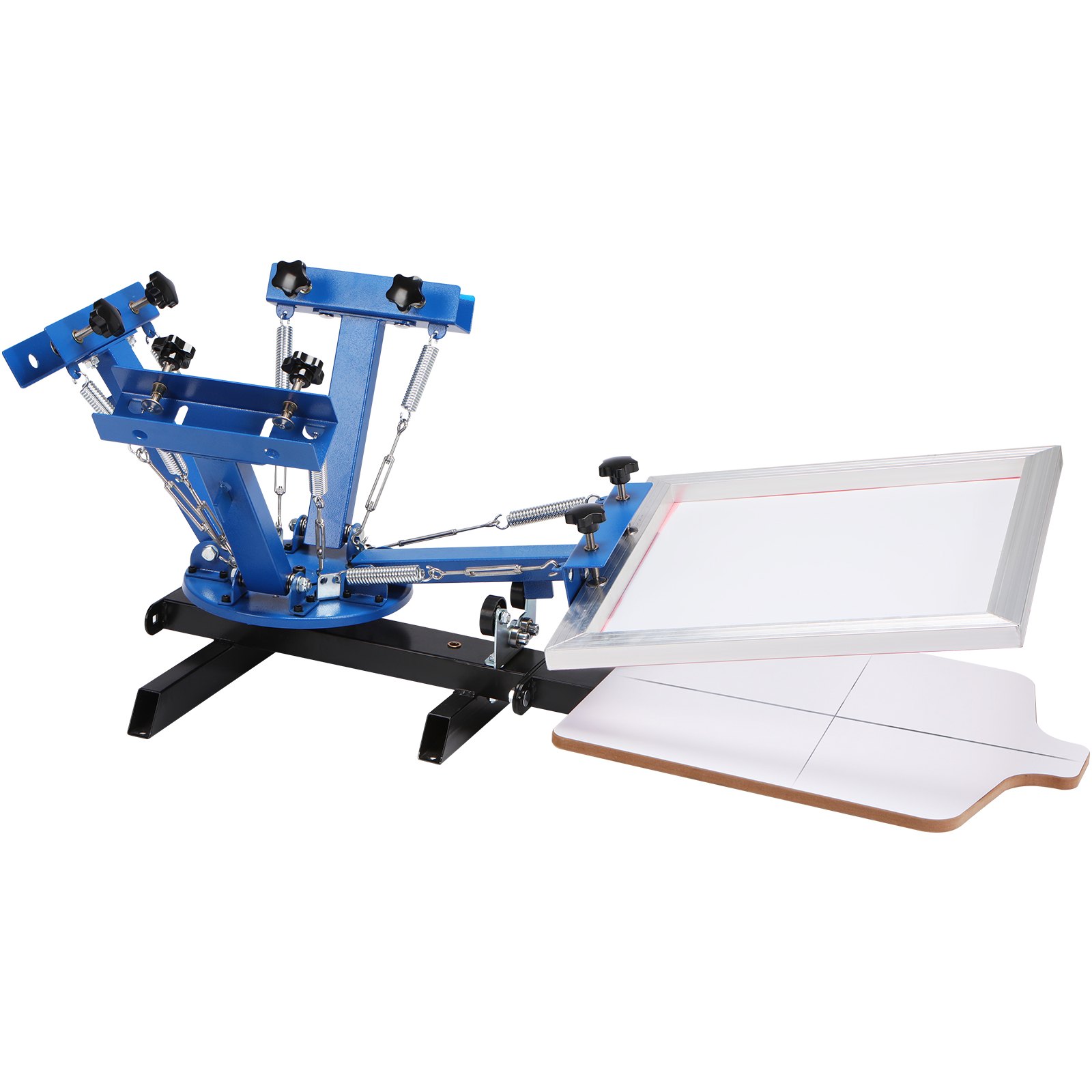
| VEVOR 4 Color 1 Station | 4 / 1 | Basic positioning | Approx. 21.2 x 17.7 in | Home use, beginners, side hustles |
| TECHTONGDA 4 Color 1 Station | 4 / 1 | Micro-registration | Approx. 18 x 22 in | Tighter multi-color alignment on a budget |
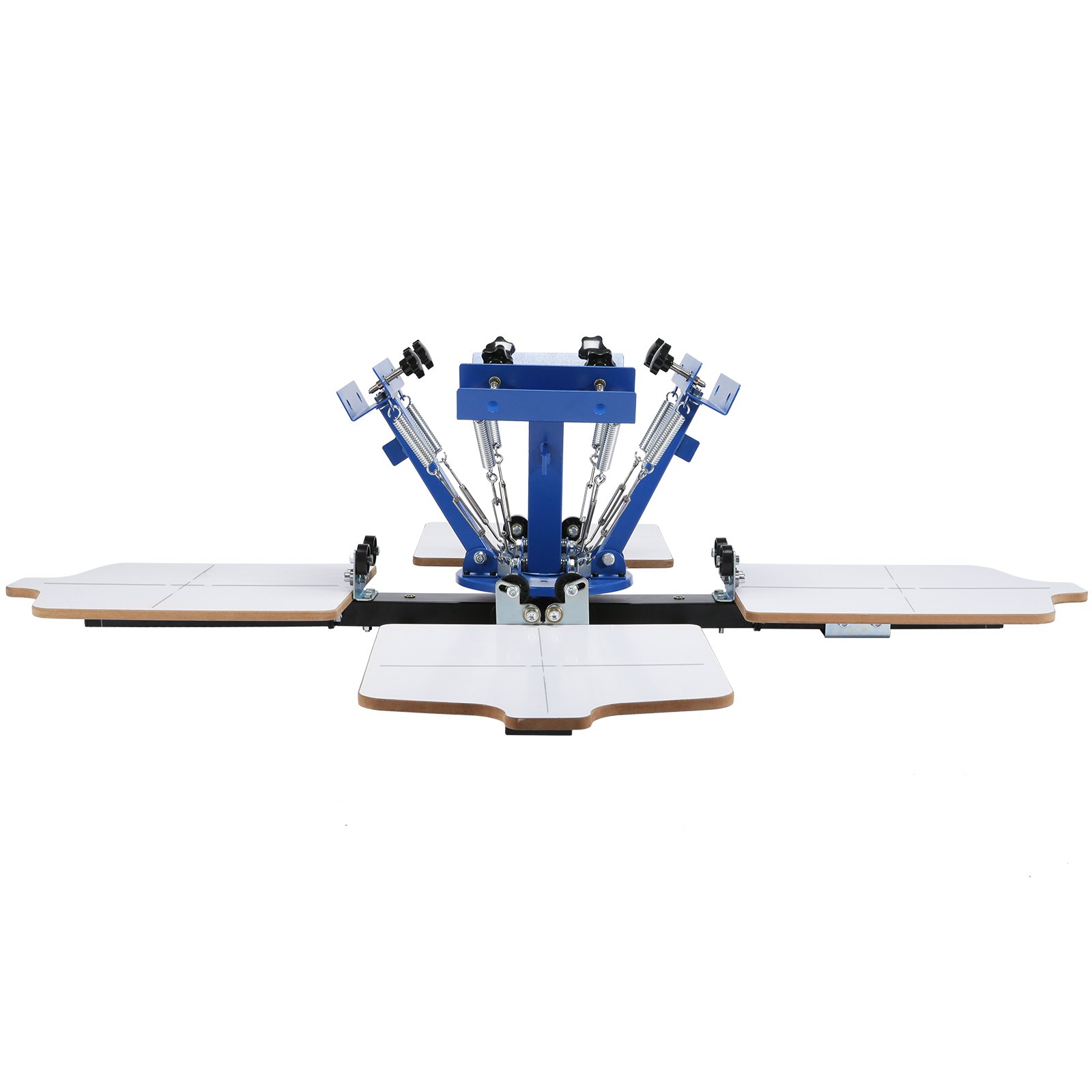
| VEVOR 4 Color 4 Station | 4 / 4 | Basic positioning | Approx. 21.2 x 17.7 in | Budget batch production |
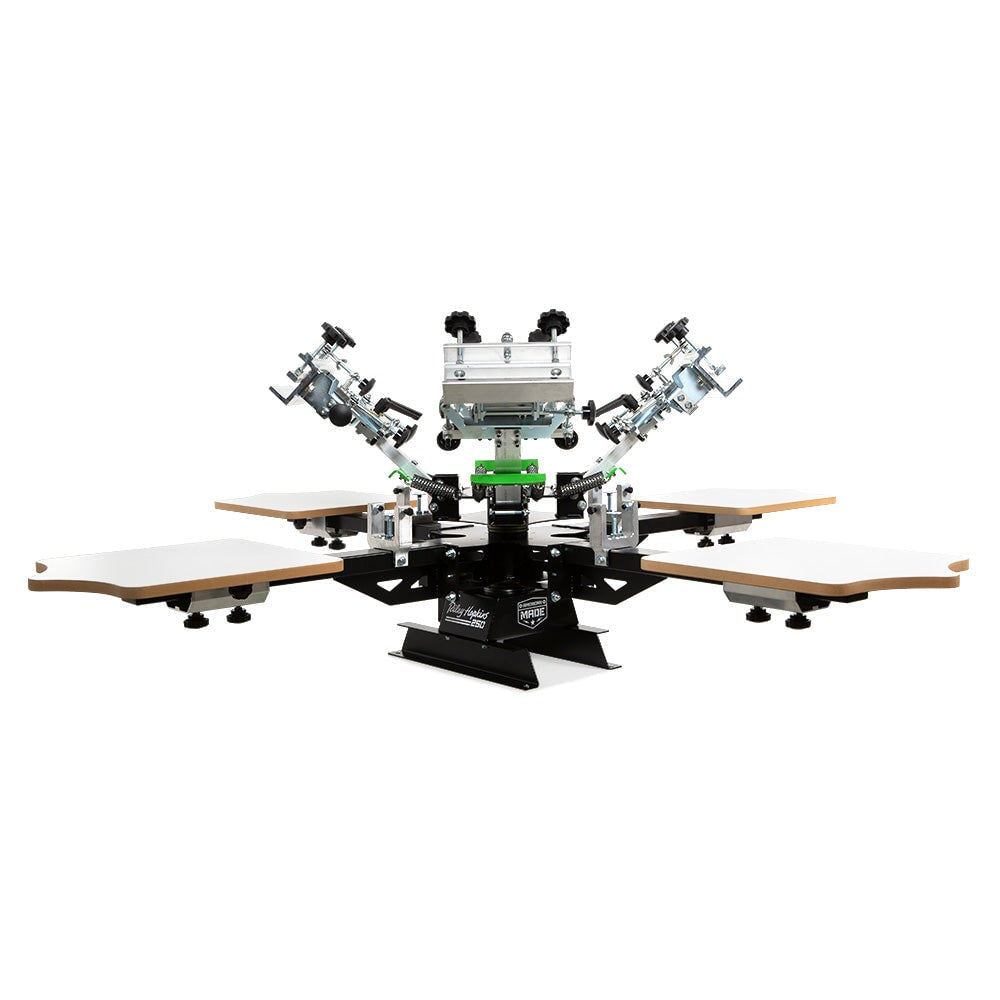
| Riley Hopkins 250+ | 4 / 4 | XYZ micro-registration | 16 x 16 in standard | Growing small business |
| TECHTONGDA 6 Color 6 Station | 6 / 6 | Micro-adjustment | Approx. 18 x 22 in | More complex multi-color production |
| CALCA 1 Color 1 Station | 1 / 1 | Manual positioning | Approx. 22 x 18 in | Simple one-color projects |
| xTool Screen Printer | Workflow dependent | xTool registration system | Frame dependent | Compatible xTool laser owners |
Free Tool: Screen Printing Break-Even Calculator
Planning to sell shirts? Estimate how many shirts you need to sell to recover your press, screens, ink, curing equipment and other setup costs.
Before comparing individual models, match the press to your actual workload. More colors and more stations are useful only when your projects need them.
| Your Situation | Good Starting Setup | Why |
|---|---|---|
| Occasional hobby printing | 1 color / 1 station | Compact and enough for logos, text and other simple one-color designs. |
| Learning multi-color printing | 4 colors / 1 station | Keeps several screens mounted while limiting footprint and cost. |
| Home side hustle | 4 colors / 1-2 stations | Balances capability, space and investment for short paid runs. |
| Growing shirt business | 4 colors / 4 stations | Multiple platens speed loading, flashing and repeat-order workflow. |
| Advanced multi-color production | 6 colors / 4-6 stations | Adds room for an underbase plus more design colors and higher-volume workflow. |
One important distinction: the number of colors tells you how many screens the press can hold at once. The number of stations tells you how many garment platens are available. A four-color, one-station press can hold four screens, but you still load only one shirt at a time.
A dark shirt can also use one of your screen positions for a white underbase. In practice, a four-color press may therefore give you three additional design colors on jobs that require an underbase.
Check Current Price on Amazon →
Features
The VEVOR 4 Color 1 Station is the machine we would point most beginners toward if they know they want to move beyond single-color printing but are not ready to devote a large room and a professional-press budget to a carousel.
The key advantage is simple: you can mount four screens at once while working from one platen. That means you can learn screen alignment, underbases, and multi-color designs without buying a large four-station press before you know whether screen printing will become a business or remain a hobby.
Its relatively compact format is also important for home users. The press is intended to be fixed to a sturdy bench or work surface, so you need to plan a permanent or semi-permanent mounting point, but you do not need the footprint demanded by a four-station production carousel.
The tradeoff is registration. This is a budget press, and it does not give you the kind of dedicated XYZ micro-registration found on a professional Riley Hopkins press. You can produce multi-color work, but fine alignment takes more patience. If your designs regularly use tight trapping, halftones, or small registration tolerances, that difference becomes more noticeable.
What we like
What could be better
Best for: beginners, Etsy sellers, home studios, and small-batch shirt printing.
Skip it if: you already have regular multi-shirt orders and know four stations will save significant loading time.
Check Current Price on Amazon →
Check Current Price on Amazon →
Features
The TECHTONGDA 4 Color 1 Station is the more interesting budget option when your priority is not simply getting four screens onto a press but being able to make finer registration adjustments between them.
The micro-registration controls are the reason to consider it over an ultra-basic four-color press. Instead of relying entirely on loosening and manually nudging a screen into place, you have dedicated adjustment points for small position changes. That does not automatically turn a budget press into a premium production machine, but it can make repeated multi-color setup considerably less frustrating.
It is still a one-station machine, so throughput is limited by garment loading. That is perfectly reasonable for a home printer learning multi-color work or a small business producing short custom runs. If you are regularly handling dozens of identical shirts at a time, the station count will become a bigger limitation than the number of colors.
What we like
What could be better
Best for: beginners and side-hustle printers who expect to do real multi-color work and value micro-adjustment more than the lowest purchase price.
Check Current Price on Amazon →
Check Current Price on Amazon →
Features
The VEVOR 4 Color 4 Station is the logical step up for someone who likes the basic VEVOR concept but is frustrated by having only one shirt loaded at a time.
The most important feature is not that it prints more colors – the four-color capacity is the same as the smaller model. The advantage is workflow. Four garment stations give you room to organize production instead of repeatedly unloading and reloading the same platen for every shirt.
That makes much more sense for a side business handling repeat orders. You can keep garments moving through the process and organize loading, printing, flashing, and unloading more efficiently than on a single-station press.
There is an important distinction between this machine and a professional four-station carousel, however. Do not assume that the low price buys the registration controls and precision of a Riley Hopkins 250+. VEVOR uses mechanical positioning to return the print heads to location, but you do not get the same tool-less XYZ micro-adjustment system.
What we like
What could be better
Best for: growing home shops that need several shirt stations but cannot justify a professional carousel.
Check Current Price on Amazon →
Features
If shirts are becoming a real source of income, the Riley Hopkins 250+ is the press on this list that most clearly shifts the conversation from “How cheaply can I start?” to “How efficiently can I produce repeatable work?”
The XYZ micro-registration system is the biggest reason. On multi-color jobs, small alignment corrections are routine. A proper micro-registration mechanism lets you make those changes through dedicated controls instead of loosening a screen, nudging it by hand, and hoping you did not overshoot the correction.
The four independent stations also make more sense once order volume rises. A printer can maintain a more continuous workflow, and the press is designed around professional frames, interchangeable platens, and accessories rather than simply providing the largest number of arms at the lowest possible cost.
That does not mean every beginner should buy one. It is expensive relative to budget presses, and its roughly 81-inch overall diameter means you need to plan your shop around it. The investment makes most sense when the machine will be used frequently enough for faster setup and repeatability to matter.
What we like
What could be better
Best for: established side hustles and small print businesses that are beginning to care more about setup time and repeatability than the lowest purchase price.

Check Current Price on Amazon →
Features
The TECHTONGDA 6 Color 6 Station belongs in this guide for buyers who genuinely need more print heads and stations – not because six is automatically better than four.
A six-color press becomes useful when designs regularly go beyond basic spot-color work. If you print on dark garments, remember that a white underbase may consume one print head. Six available screens therefore give you considerably more creative headroom than a four-color machine.
The six stations also suit a workflow built around repeated garments, but there is a cost beyond the purchase price: space. This is large, heavy equipment. Once installed, you should treat it as a permanent shop fixture rather than something you roll out on weekends.
The available micro-adjustment controls are another advantage over very basic budget carousels. Nevertheless, buyers at this level should compare the TECHTONGDA against established professional press ecosystems before deciding. Parts availability, service, and long-term adjustment support matter more as equipment becomes central to a business.
What we like
What could be better
Best for: established workshops that specifically need more than four screen positions.
Check Current Price on Amazon →
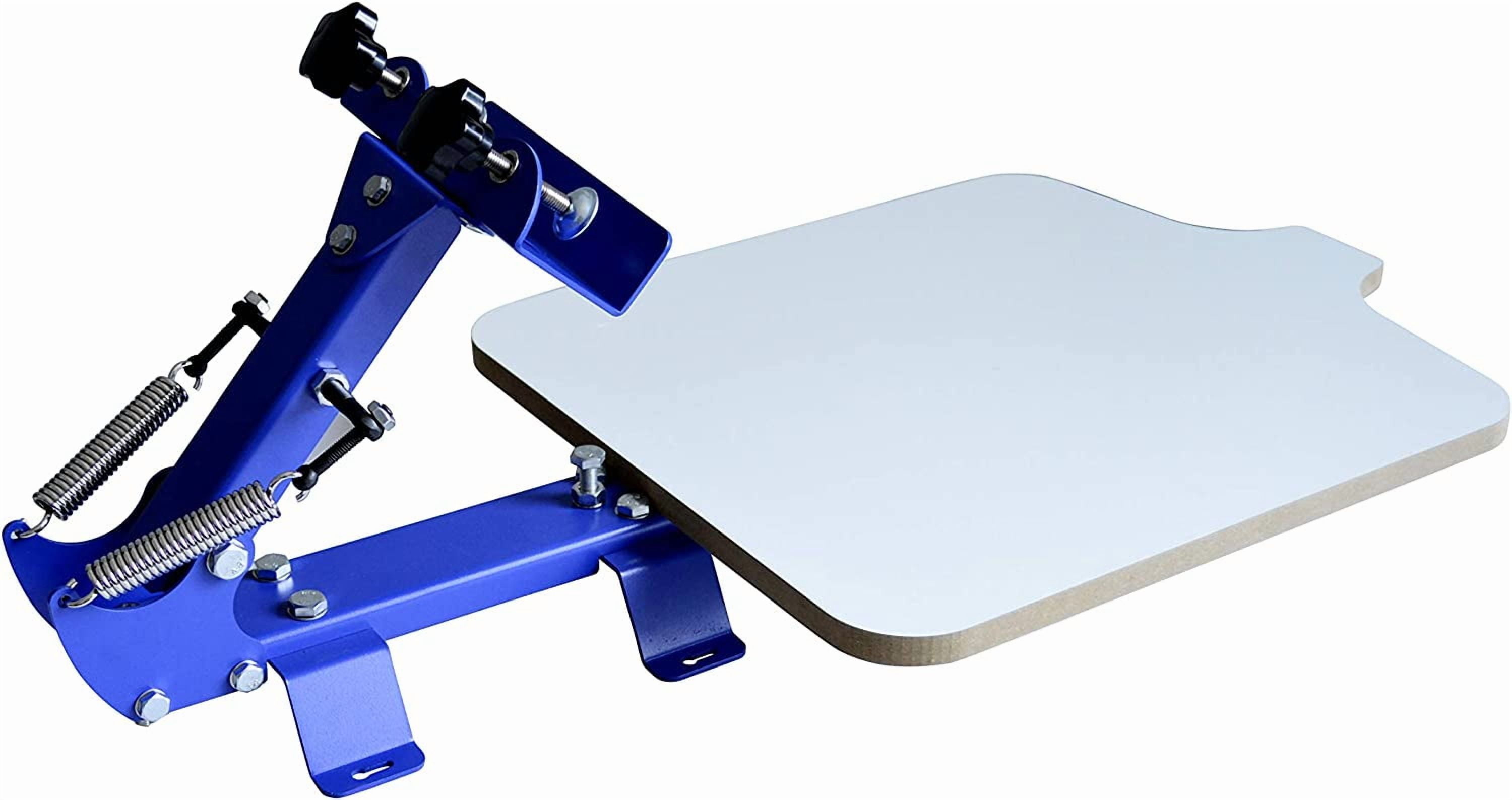
Check Current Price on Amazon →
Features
Not every screen printer needs four colors.
If your projects are mainly one-color logos, text, event shirts, tote bags, or simple graphic designs, a single-color press is cheaper, smaller, and easier to understand. The TECHTONGDA 1 Color 1 Station is therefore a more rational purchase for some beginners than buying a complicated carousel they may rarely use.
Its 22 x 18-inch working area is generous for normal apparel work, and the tabletop format is easier to accommodate than multi-station equipment. The pallet can also be adjusted front to back to help position designs on the garment.
The obvious limitation is growth. Once you want repeatable two-, three-, or four-color designs, changing screens on a single-head machine quickly becomes inconvenient. That is why we recommend it only when simplicity is genuinely part of the requirement.
What we like
What could be better
Best for: simple one-color projects, occasional home use, and beginners who know multi-color work is not a priority.
Check Current Price on Amazon →

Features
The xTool Screen Printer is here because it solves a different problem from the conventional presses above.
In traditional photo-emulsion screen printing, making the stencil can involve coating, drying, exposing, washing out, and drying the screen again. xTool instead lets owners of compatible laser equipment engrave a prepared screen. For someone who already has a compatible xTool laser, that can make screen preparation much faster and reduce the number of wet-process steps involved.
There is a major caveat: the compatible laser is sold separately. If you do not already own an appropriate xTool machine, the total cost changes the value equation substantially. We would not buy an entire laser ecosystem merely because we wanted the cheapest route into basic screen printing.
For an existing xTool owner, however, this is one of the more interesting ways to add screen printing to a maker workspace without building a conventional stencil-preparation workflow from scratch.
What we like
What could be better
Best for: xTool owners, maker studios, and users prioritizing simplified stencil creation.
A four-color press does not mean every design needs four colors. It means four screens can remain mounted and registered at the same time.
If you make mostly one-color text and logos, a one-color press may be enough. If you expect multi-color shirt graphics, four heads are a much more flexible starting point. For dark shirts, remember that a white underbase can occupy one of those heads.
Six-color presses make sense once your work actually requires that complexity. Buying extra heads you never use only gives you a larger, more expensive machine to assemble and maintain.
A station is the platen that holds the shirt or other flat substrate.
On a one-station machine, you finish working with one garment before replacing it with another. Multiple stations give a production-oriented printer more room to organize loading, printing, flashing, and unloading.
For occasional custom shirts, one station is perfectly reasonable. For repeated paid orders, multiple stations become much more valuable. If you are pricing those orders, the screen printing break-even calculator can help you estimate when the extra station capacity is financially worthwhile.
Multi-color printing depends on each screen landing in the correct position relative to the others.
Basic presses require more manual adjustment. Proper micro-registration gives you dedicated controls for making very small screen-position corrections. The improvement is not simply that the final image can look better – it is that you spend less time fighting registration during setup.
That is why we see micro-registration as much more important to a business than to someone printing a few shirts each month.
A 16- or 18-inch platen may sound compact, but a four-color carousel needs clearance for its print heads to rotate. A multi-station machine needs even more working room.
Before ordering, measure:
A machine that technically fits against a wall may still be impossible to use comfortably.
Tabletop presses can save space, but they still need a very stable mounting surface. A screen press moves and experiences repeated force during the print stroke; mounting it to a lightweight folding table defeats the point of buying a rigid press.
Floor-standing systems make more sense as equipment becomes heavier and production volume increases.
The press is only one part of a screen-printing setup. If your main goal is shirt decoration rather than screen printing specifically, our T-shirt printing machine guide compares alternative workflows. For a conventional screen-printing setup, you may also need:
This is why the cheapest press is not always the cheapest complete setup.
Before you spend more on equipment
Use the Crafty Hangouts break-even calculator to compare your total setup cost with your expected profit per shirt. It is especially useful when deciding whether moving from a one-station press to a four-station setup is financially justified.
For the home users and small shops this guide is aimed at, a manual press is usually the right place to start.
Automatic presses dramatically increase production capacity but also move the purchase into a completely different budget and operating environment. They make sense when order volume is high enough that labor and throughput have become a real business constraint.
If you are still learning registration, ink control, and curing, a good manual press teaches you the fundamentals without requiring an industrial-scale investment. If you would rather work with HTV or printable transfers, see our guides to using a Cricut for shirts and choosing the best printer for heat transfers.
A press gets the screen onto the shirt, but it does not create the stencil or permanently cure the finished ink.
For a conventional setup, expect to build a workflow around:
If your goal is simply custom T-shirts and you are not committed to screen printing specifically, compare the process with our best heat press guide, best T-shirt printing machines, printers for heat transfers, and heat transfer paper guide before investing in a complete screen-print shop.
Related Crafty Hangouts guides
For a beginner who expects to make multi-color shirts, a four-color, one-station manual press is a practical starting point. It provides room to learn registration and multi-screen work without the cost and footprint of a four-station production machine. The VEVOR 4 Color 1 Station is our value-oriented starting point, while the TECHTONGDA 4 Color 1 Station is more attractive if you specifically want micro-registration.
Four colors are enough for many beginners and small custom-print operations. A dark garment may require a white underbase, effectively leaving three additional heads for design colors. Buy six colors when your actual work requires them rather than simply assuming more is always better.
It is better for production volume, not necessarily for every user. Both machines can keep four screens mounted. The four-station press adds garment platens, making repeated shirt production more efficient. A one-station machine is cheaper and takes up less room.
You can screen print without it, but micro-registration makes precise multi-color alignment much easier. It becomes increasingly valuable when you print professionally, use detailed multi-color artwork, or frequently change jobs.
Yes. A compact manual press can work in a garage, basement, or dedicated craft room, provided you have enough room for the press, screens, inks, and curing equipment. Pay attention to ventilation, chemical handling, and the requirements of the ink and cleaning products you use.
Some ink systems and workflows can use a heat press for curing or finishing, but curing requirements depend on the exact ink manufacturer. Follow the ink maker’s specified temperature, time, and application method rather than assuming one setting works for all screen-printing inks. For heat-transfer projects rather than screen-printing ink, our heat press temperature chart covers time, temperature and pressure starting points.
Neither is universally better. Screen printing becomes particularly attractive for repeated designs and larger batches, while heat-transfer methods can be easier for short runs and highly variable artwork. The better choice depends on order volume, number of colors, design complexity, and equipment budget.
The VEVOR 4 Color 1 Station is our best overall recommendation for most beginners and home side hustles. It gives you four-color capability, a useful shirt-sized platen, and a relatively compact footprint without demanding the investment of a professional production press.
If you want budget-friendly micro-registration, choose the TECHTONGDA 4 Color 1 Station. The single station keeps it realistic for home and short-run work, while the micro-adjustment controls are useful when multi-color alignment matters.
If screen printing is already becoming a real business, the Riley Hopkins 250+ 4 Color 4 Station is the stronger long-term tool. The price is dramatically higher, but the XYZ micro-registration, four production stations, and professional platen/accessory ecosystem address the things that begin costing a working print shop time.
Before buying any machine, decide how many colors you genuinely use, how many shirts you expect to produce in a batch, and how much permanent workspace you can give the press. Those three answers are more useful than simply buying the machine with the highest number of heads and stations.
Our top Amazon pick
The VEVOR 4 Color 1 Station is the most balanced starting point for readers who want multi-color capability without committing to a full production carousel.